


Software Development: A Beginner's Guide
Summary (TL;DR)
In this post, you'll find information on the growth of software development, which has become a highly valued skill in the technology market.
The demand for developers continues to increase, especially with the digitalization of various sectors, and IT investments in Brazil have shown impressive figures.
We'll cover what software development is, its main areas, such as front-end, back-end and full-stack, and some of the programming languages recommended for beginners, such as JavaScript, Python, Java and C#.
You'll also find practical tips for those just starting out, such as the importance of creating personal projects and getting involved in developer communities, as well as learning about essential tools such as IDEs, version control and learning platforms.
Finally, we'll explain the stages of the software development cycle, from analysis to maintenance, and the importance of building a solid portfolio to stand out in the job market.

O software development is constantly growing and has become one of the most valuable skills in the technology market. Whether it's creating applications, websites, business systems or even games, learning to program opens doors to countless professional opportunities. What's more, with the digitalization of practically every sector, the demand for developers is only increasing.
To give you an idea, in 2024 the investments in the software and IT sector in Brazil amounted to US$58.6 billion, according to data from the Brazilian Association of Software Companies (software house‘s). As a result, Brazil reached 10th place in the world ranking for investments in the IT sector.
If you're just starting out and want to learn more about software development for beginners, this guide is for you! We'll explain the essential concepts, the main programming languages and how to choose the best one to start programming.
What is Software Development?
Software development is the creation, maintenance and improvement process of programs that perform functions on electronic devices. These programs can be used for a variety of purposes, from operating systems to cell phone applications and business software.
There are two main types of software:
- System software: includes operating systems (such as Windows, macOS and Linux) and other programs that allow the hardware to function properly.
- Application software: are the programs we use on a daily basis, such as web browsers, text editors, messaging apps and games.
To develop software, you need to program - in other words, writing code using programming languages. There are different areas within development, such as programming front-end vs. back-end, These determine which parts of the software a professional works on.
The developers software can also act in different ways:
- Front-end: trabalha na interface e na user experience, garantindo que os sites e aplicativos tenham um responsive design e funcional.
- Back-end: focuses on the logic of the system, servers and database, ensuring that everything works correctly behind the interface.
- Full-stack: works on both the front-end and back-end, and is responsible for the complete development of a system.
Main Programming Languages for Beginners
Choosing a programming language to start with can be a challenge, as there are many options on the market. Some are more intuitive for beginners, while others are widely used in the industry. professional development. We've highlighted four of the most recommended languages for those who want to take their first steps:
JavaScript
JavaScript is one of the most popular and essential languages for web development. It is mainly used in the front-end, making interactive and dynamic websites. It can also be applied to the back-end using Node.js, making it a versatile option for those who want to work with complete web development.
Python
Python is an easy-to-learn language that is widely used for data analysis, artificial intelligence and web application development. Its simple syntax makes it easy for beginners to learn, and it is one of the most widely used languages in the world of technology.
Java
Java is a robust and widely used language for developing applications, corporate systems and even Android apps. Although it has a slightly more challenging learning curve, it is one of the most valued on the market, especially for large-scale projects.
C#
The C# is widely used for development of games, desktop applications and business software. If you're interested in game programming, this could be an excellent place to start.
How to Choose the First Language to Learn?
The choice of the first programming language should be aligned with your objectives. For example:
- JavaScript → Ideal for web development, both front-end and back-end;
- Python → A versatile and easy-to-learn language used in artificial intelligence, data analysis and web development;
- Java → Widely used in corporate applications and Android app development;
- C# → Great choice for those who want to work with game development and business applications.
The most important thing is to choose a language that suits your interests and practice a lot to consolidate your learning!
Essential tools for those starting out
For those starting out in software development, having the right tools is essential for productivity and learning. From development environments (IDEs) to version control and learning platforms, these solutions help beginners write, test and organize their code more efficiently.
Check out some of the main ones development tools software that every beginner should know:
IDEs (Visual Studio Code, Eclipse)
Ooma IDE (Integrated Development Environment) is a development environment that combines a code editor, debugging and other features to make programming easier. O Visual Studio Code is one of the most popular IDEs, known for its lightweight interface and support for various languages. The Eclipse is widely used for Java development and is a robust option for larger projects.
Version control (Git and GitHub)
O version control allows developers to keep track of changes in the code, revert changes when necessary and collaborate with other programmers. O Git is the most commonly used tool for this purpose, while GitHub is a cloud-based platform where projects can be stored and shared, facilitating teamwork.
Learning platforms (Codecademy, Alura, Udemy)
For those just starting out, learning platforms offer practical courses on various languages and frameworks. O Codecademy focuses on interactive learning, while Alura offers courses in Portuguese with complete tracks. The Udemy has a wide range of accessible courses, with content aimed at both beginners and more experienced developers. Here's an example of a software engineering course on Udemy:
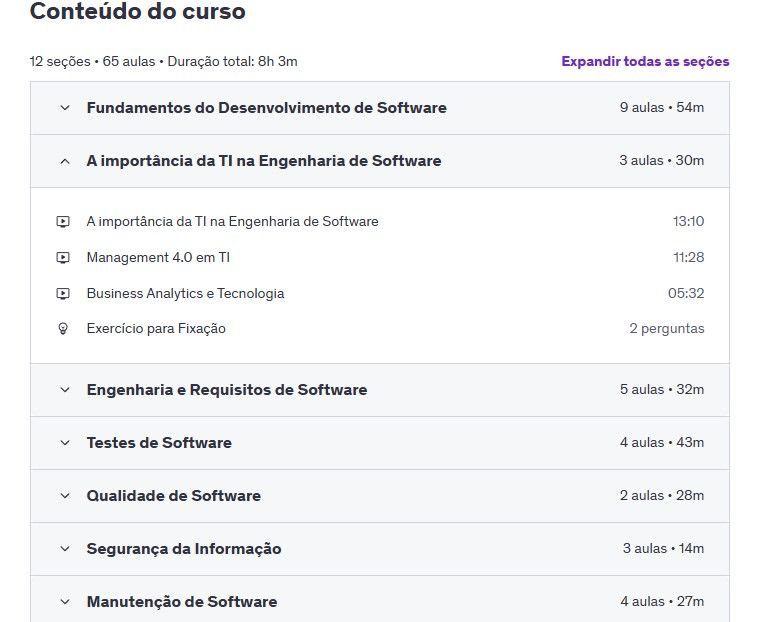
In this course syllabus we can see the subjects that are covered, as well as the video lessons and exercises. This shows how the platform provides complete learning in the field of software development.
Stages of the Software Development Cycle
The software development cycle is a set of steps that guide the creating a system, This ensures that it is planned, developed and tested efficiently. This process is essential if the software is to meet user expectations and function correctly. See the main phases of this cycle:
Analysis
The analysis phase involves gathering software requirements. At this stage, the developers and stakeholders define what problems the system should solve, what functionalities it needs to have and what the end user's needs are.
Design
This is where the software is structured. The design includes the system architecture, user interface and database planning. This planning ensures that the software has a well-organized structure and is scalable.
Program
The programming phase is where the code actually starts to be written. Developers use programming languages and frameworks to transform the plan into a functional system. This stage can be divided into front-end, back-end and database, depending on the complexity of the software.
Here's an example of code for an online store:
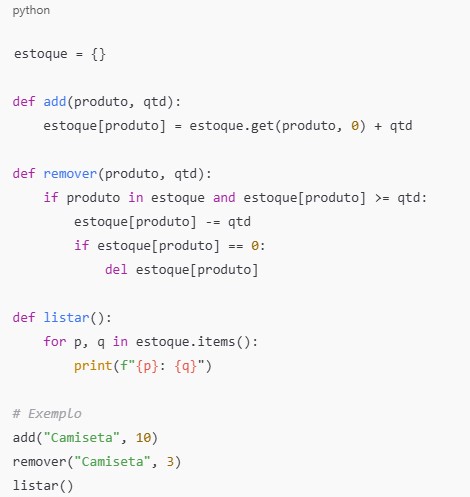
This code covers the basic functions: adding, removing and listing products. Simple and functional for illustrative purposes!
Tests
Testing is essential to ensure that the software works correctly before it is released. In this phase, unit, integration and usability tests are carried out in order to identify and correct flaws in the system.
Maintenance
After launch, the software enters the maintenance phase, where possible errors are corrected and new functionalities can be added as required by users. This stage is essential for keeping the software up-to-date and efficient in the long term.
Practical tips for beginners
Starting to program may seem challenging at first, but with practice and dedication, anyone can develop solid skills. The secret lies in testing, making mistakes and learning from experience. As well as studying theory, putting knowledge into practice is essential.
If you want to know how to start programming, here are some valuable tips to speed up your learning and excel in the field:
Personal projects
Creating your own projects is one of the best ways to learn and apply programming concepts. Developing small systems, simple applications or even day-to-day automations helps to consolidate learning and to understand how programming is done. codes work in practice. In addition, choosing programming languages for beginners, such as Python or JavaScript, makes this process easier.
Networking
Building a career in software development goes beyond just learning to program. Creating connections in the sector, seeking mentoring and attending events are great ways to accelerate professional growth. In addition, investing in courses and certifications can open doors and make your CV more attractive for opportunities in the technology market.
Communities
Programming has a strong collaborative culture, and participating in online communities can be extremely enriching. Platforms such as GitHub, Stack Overflow and specialized forums allow beginners to ask questions, share knowledge and learn from more experienced professionals. Being part of these networks is one of the best tips for beginners in programming.
How to Build a Developer Portfolio
Having a well-structured portfolio is essential to showcase your skills and win good opportunities in the market. It should include practical projects, highlighting their main skills and the technologies they use. Web applications, APIs, automations and even projects open source are great ways to demonstrate your technical ability.
A organização do portfólio também é importante. Criar um repositório no GitHub ou um personal website com um layout limpo e bem estruturado são ideias bem legais para expor seu trabalho. Além de mostrar projetos bem documentados, incluir uma seção sobre suas habilidades, experiências e certificações pode tornar seu perfil ainda mais atrativo para recrutadores e empresas.
Conclusion
Becoming a developer takes practice, patience and good planning. From choosing a language to building a solid portfolio, each stage of learning contributes to growth in the field. Personal projects, networking and communities are key to speeding up this process and ensuring a more complete apprenticeship.
If you want a software development guide that will help you take your first steps in a structured way, keep reading our contents. The world of technology is constantly evolving, and the right time to start is now! Click on the button below for a quote:
Frequently Asked Questions
What is software development?
Software development is the process of creating, maintaining and improving programs that run on electronic devices such as computers and smartphones. These programs can be operating systems, applications, games or business software, and development involves everything from creating the code to implementing and testing the systems.
What are the main programming languages for beginners?
For beginners, some recommended programming languages are:
-
JavaScript: Ideal for web development, both front-end and back-end.
-
PythonFamous for its simplicity and versatility, used in areas such as artificial intelligence and web development.
-
Java: Widely used in corporate systems and Android application development.
-
C#: Excellent for those who want to work with game development and desktop applications.
How do you choose your first programming language?
The choice of the first language depends on your interests. If you want to work in web development, JavaScript might be a good choice. If your focus is artificial intelligence or data analysis, Python is recommended. For those who want to create Android applications, Java is a great option, and if you're interested in developing games, C# is an interesting choice.
What are the essential tools for those starting out in software development?
Some essential tools for beginners include:
-
IDEs (Integrated Development Environments), such as Visual Studio Code and Eclipse, to write and debug code.
-
Git and GitHub, for version control and project collaboration.
-
Learning platforms, Such as Codecademy, Alura and Udemy, which offer interactive and structured courses to learn programming in a practical way.

Lucas Pelisari
Lucas Pelisari é especialista em SEO e conteúdo na UpSites há mais de 6 anos, atuando na criação e otimização de estratégias digitais focadas em geração de leads e crescimento orgânico. Com experiência em projetos de desenvolvimento de sites, SEO on-page e link building, trabalha diretamente na estruturação de conteúdos e páginas voltadas para posicionamento no Google e aquisição de tráfego qualificado. Ao longo de sua atuação, já participou de projetos para empresas como Kommo, Aldanth, Physical Care, In4, Design.com, Adaptive, Clipto e YeSim, além de diversos outros clientes atendidos pela UpSites. Atua em projetos de diferentes nichos, incluindo tecnologia, SaaS, serviços e negócios locais, com foco em performance, conversão e escalabilidade. Seu trabalho está diretamente ligado ao crescimento de leads e aumento de visibilidade orgânica, com projetos que registraram ganhos consistentes de tráfego após a implementação de estratégias de SEO e conteúdo. Seus conteúdos abordam temas como criação de sites profissionais, SEO, estrutura de páginas, performance, experiência do usuário e estratégias de crescimento digital, sempre com uma abordagem prática e baseada em cenários reais de mercado. Redes profissionais: LinkedIn: https://www.linkedin.com/in/lucas-widmar-pelisari-78920033/
See all posts


 Calculate Price Now