


Web Accessibility: What it is, guidelines, and examples in 2026
Summary (TL;DR)
Web accessibility is essential to ensure that all users, regardless of their abilities, can effectively access and interact with online content. This post discusses the importance of accessibility, showing how it directly benefits people with disabilities and the elderly, and improves the overall user experience. Furthermore, accessibility practices such as alt text for images, keyboard navigation, and the use of appropriate color contrasts are highlighted as ways to make the web more inclusive.
The post also explores the accessibility principles and guidelines established by the WCAG, which provide clear criteria for developers to ensure their websites are accessible. Principles such as perceivability, operability, understandability, and robustness are explained with practical application examples.
Finally, tools and resources are presented that facilitate the implementation of accessibility on WordPress websites, promoting digital inclusion and improving the overall usability of the sites. Adopting these practices not only fulfills legal and ethical obligations but also positions companies as leaders in innovation and inclusion.

In the increasingly predominant digital landscape of our lives, the web accessibility emerges as a fundamental principle for ensuring that the internet is an inclusive and accessible space for everyone.
In a world where technology is becoming increasingly intrinsic to our daily routines, it is essential to understand what web accessibility is and why it plays such a crucial role in ensuring that all users, regardless of their physical or cognitive abilities, can effectively access and interact with online content.
Today, we will understand how web accessibility is not just about making websites accessible for people with disabilities, but also about promoting an inclusive experience for all users, regardless of their abilities or circumstances.
Throughout this journey, we will explore the principles, guidelines, and practical examples that demonstrate the vital importance of web accessibility in today's digital world.
What is Web Accessibility and why is it important?
Web accessibility is fundamental nowadays, and its importance will only grow as society becomes increasingly digitized. In this topic, we will explore why web accessibility is crucial and how it benefits various user groups.
- Inclusion Promotion: One of the main reasons web accessibility is so crucial is because it promotes digital inclusion. Making websites accessible to people with disabilities, the elderly, and other user groups means everyone has the opportunity to access and interact with online content. This is essential to ensure no one is left behind in the digital age.
- Disability Benefits: Web accessibility brings a series of direct benefits to people with disabilities. For example, for people with visual impairments, features like screen readers and image descriptions allow them to navigate the web and consume digital content. Similarly, people with motor impairments can benefit from adaptive virtual keyboards and other assistive technologies that make web navigation more accessible.
- Elderly Facilitation: Besides people with disabilities, web accessibility is also crucial for the elderly. With an aging population, it is increasingly important to ensure that websites are easy to use and understand for those with limited digital skills. Elements such as readable fonts, simple layouts, and large buttons can make a big difference in the online experience for seniors.
- Improvement of User Experience To everyone: Um aspecto importante a ser destacado é que a acessibilidade web não beneficia apenas grupos específicos de usuários, mas sim a todos. Por exemplo, legendas em vídeos não são úteis apenas para pessoas com deficiência auditiva, mas também para quem está assistindo a um vídeo em um ambiente barulhento ou silencioso. Da mesma forma, a website creation com navegação simplificada e carregamento rápido beneficia a todos os usuários, independentemente de suas habilidades ou circunstâncias.
In summary, web accessibility is crucial today because it promotes inclusion, directly benefits people with disabilities and the elderly, and improves the user experience for everyone. It is an essential part of ensuring that the internet is an accessible and inclusive space for all users.
Web Accessibility Principles and Guidelines
The principles and Web accessibility guidelines are fundamental to ensuring that websites are accessible to all users, regardless of their abilities.
Established by the Web Content Accessibility Guidelines (WCAG), these principles provide a set of criteria that developers must follow to ensure a website's accessibility. Let's explore these principles and guidelines in more detail:
- Perceptibility The Principle of Perceptibility concerns the ability of users to perceive the content presented on a website. This includes ensuring that content is presented in a perceptible way through different sensory modalities, such as sight, hearing, and touch. Guidelines for achieving perceptibility include providing textual alternatives for non-textual elements (like images and videos), ensuring sufficient contrast between text and background, and offering captions and transcripts for audio and video content.
- Operability The operability principle refers to the ease with which users can operate and interact with the website. This includes ensuring that all website functionalities are accessible through a variety of input devices, such as a keyboard, mouse, and assistive devices. Guidelines for achieving operability include ensuring that all website functionalities can be operated using only the keyboard, providing sufficient time for users to interact with the content, and avoiding content that may cause seizures.
- Comprehensibility The principle of comprehensibility refers to users' ability to understand the content and operation of the website. This includes ensuring that content is presented clearly and understandably, using simple language and a logical structure. Guidelines for achieving comprehensibility include using clear and simple language, providing clear and predictable instructions, and organizing content logically and consistently.
- Robustness The principle of robustness refers to a website's ability to be correctly interpreted by a wide variety of user agents, including web browsers, assistive devices, and future technologies. This includes ensuring that the website's code is valid and compliant with web standards, and that the website is designed to gracefully handle interpretation errors. Guidelines for achieving robustness include using standard web technologies, ensuring code is semantically correct, and testing the website on a variety of browsers and devices.
By following the web accessibility principles and guidelines established by the WCAG, developers can ensure their websites are accessible to all users, providing an inclusive and equitable web experience.

Examples of Web Accessibility
Web accessibility is fundamental to ensure that all users, regardless of their abilities, can use and interact with websites and applications.
Here are some practical examples of how to apply web accessibility:
Alt Text for Images

Creating clear and descriptive alternative text (alt text) for images is an essential practice.
Alt text allows screen readers, used by people with visual impairments, to describe images, providing a complete understanding of the visual content.
A great example of using alt text can be found on the website of Paralympic.org, making images and videos accessible to all visitors.
The image shows three blindfolded players competing in a game of goalball. Therefore, the alt text was created describing exactly that: “Three blindfolded players compete in a game of goalball.”.
This not only helps visually impaired users but also improves SEO, as search engines use these descriptions to index images
Keyboard Navigation and Screen Reader
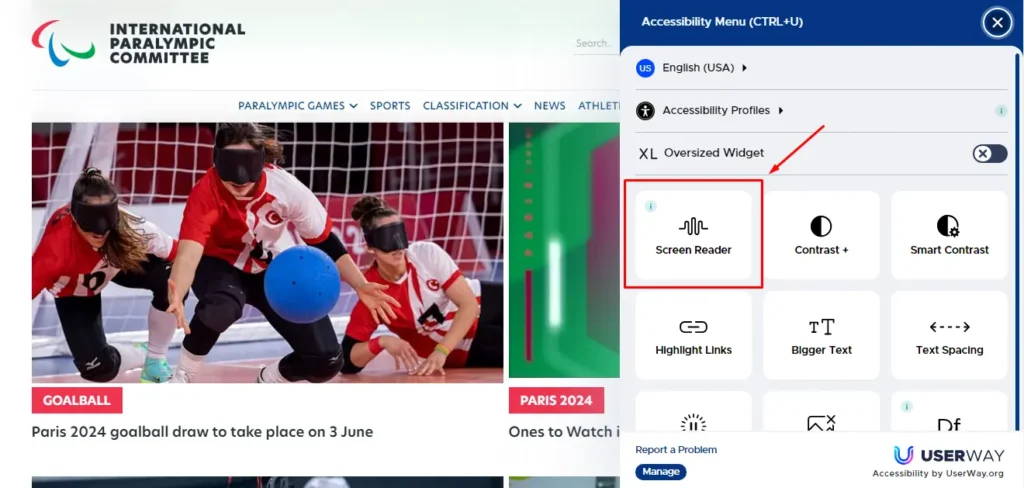
Many users with motor or temporary disabilities, such as an arm injury, rely on keyboard navigation.
Sites that allow navigation using tab, arrow keys, and others, without needing a mouse, offer a more inclusive experience.
For example, the website of Paralympic.org allows for efficient keyboard navigation, making it easier to access all interactive elements.
Additionally, compatibility with screen readers, which “read” page content aloud, is crucial for visually impaired users.
Audio Transcriptions and Subtitles
Providing transcripts for audio content and captions for videos is essential for accessibility.
This benefits people with hearing loss, as well as those who prefer to read or are in environments where they cannot use sound.
Some examples of web accessibility concerning transcripts (closed captions):
- YouTube: The platform allows for automatic caption generation and offers the option to add custom captions, making videos more accessible for people with hearing impairments.
- TED Talks: All videos on the TED website have transcripts and subtitles in multiple languages, ensuring global accessibility.
- Netflix: The streaming platform includes subtitle options and detailed audio transcriptions for most of its content, making it accessible to users with hearing and visual impairments.
Color Contrast and Readability

Using adequate color contrast and legible fonts improves readability for all users, especially for those with low vision.
The image we took a screenshot of, used in the example above, is from the website of the Match Stoneware, which uses white text on a black background, providing excellent contrast that makes it easy to read.
Accessible Forms
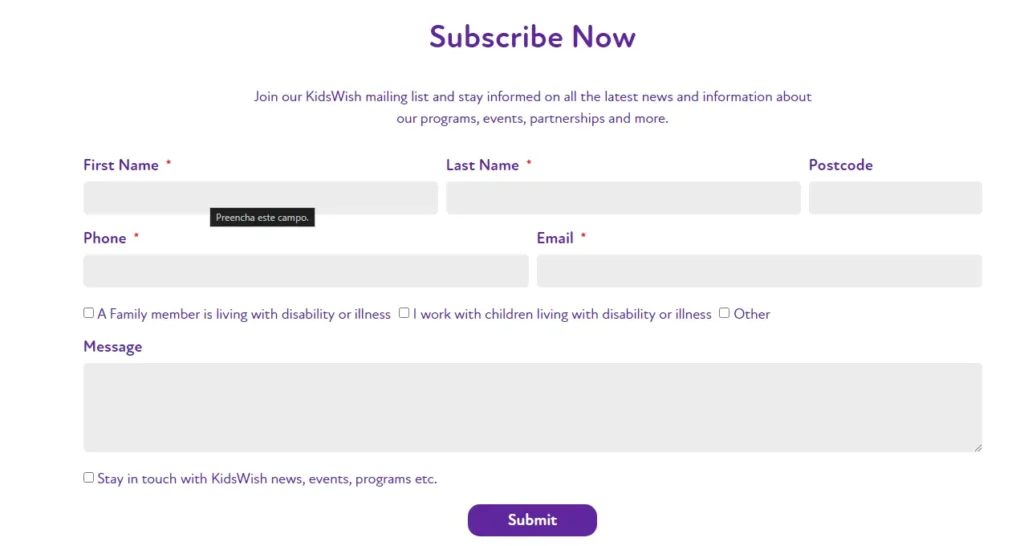
Ensuring form elements have adjacent descriptive labels makes them easier for all users to fill out, including those who use screen readers.
Sites such as KidsWish are designed with keyboard-friendly navigation and clearly labeled form elements, making the user experience more intuitive and accessible.
Implementing these practices not only benefits users with disabilities but also improves the experience for all website visitors. Web accessibility is an essential practice that promotes digital inclusion, enhancing usability and overall user satisfaction.
When it comes to web accessibility, implementing good design practices is essential to ensure that websites are accessible to all users.
By implementing these accessibility best practices, companies can ensure that their websites are accessible to all users, providing an inclusive and equitable user experience on the web.
By highlighting cases of companies that have successfully implemented accessibility practices, we can inspire other organizations to prioritize accessibility in their own digital projects.
Web Accessibility Tools for Websites
To aid in the evaluation and implementation of web accessibility, various tools and resources are available.
Let's explore some options that can be useful for developers, designers, and other professionals involved in creating accessible websites:
Web Accessibility Testing Tools
There are several online tools that can help check the accessibility of a website according to the established guidelines from the Web Content Accessibility Guidelines.
Some examples include:
- WAVE (Web Accessibility Evaluation Tool)Tool that provides detailed reports on potential website accessibility issues.
- ACheckerTool that evaluates web content accessibility and offers suggestions for correction.
- AxeOpen-source tool that identifies accessibility issues and provides detailed information to fix them.
Web Accessibility Browser Plugins
There are also plugins available for web browsers that can help identify and fix accessibility issues in real-time. Some examples include:
- Axe Browser ExtensionExtension that allows you to check a website's accessibility while browsing it.
- Web DeveloperBrowser extension that offers a set of useful tools for web developers, including accessibility checks.
Web Accessibility Best Practices Guides
Various online guides and resources provide guidance and Web accessibility guidelines.
Itself World Wide Web Consortium (W3C) offers a complete guide to Web Content Accessibility Guidelines (WCAG), which is considered the gold standard for web accessibility.
Web Accessibility Online Communities
Finally, there are online communities dedicated to web accessibility, where professionals can share knowledge, experiences, and resources related to accessibility. Some examples include:
- A11Y ProjectA community initiative to help make web accessibility more accessible.
- WebAIM CommunityAn active forum where web accessibility professionals and enthusiasts discuss challenges, solutions, and best practices for creating a more inclusive web environment.
These tools and resources are essential to ensure websites are accessible to everyone, promoting digital inclusion and improving the user experience for people with different needs.
Web Accessibility for WordPress
Ensuring your WordPress site is accessible to all users is essential for promoting inclusion and avoiding potential legal issues.
Fortunately, there are several tools and plugins that make it easier to implement accessibility practices in WordPress.
Here are some recommended options to make your website more accessible.
Web Accessibility Plugins for WordPress
- WP Accessibility The plugin WP Accessibility It is a free solution that addresses common accessibility issues in WordPress themes. It adds various functionalities, such as the ability to highlight focusable elements, add skip links, check color contrast, among others. This plugin is ideal for beginners, as it does not require coding knowledge and its options can be activated or deactivated directly in the WordPress settings panel.
- One-Click Accessibility O One-Click Accessibility Simplify your website's accessibility improvement without the need for complex configuration. It allows you to resize fonts, adjust contrasts, add skip links, and underline links, among other features. In addition to being easy to use, this plugin also improves search engine optimization (SEO).
- WP Accessibility Helper (WAH) O WP Accessibility Helper offers a range of tools to improve your website's navigation and content visibility. It includes options for changing contrasts, removing complicated animations, and using light or dark sidebar themes. This plugin is suitable for beginners and offers a premium version with additional features such as accessible pop-up windows and monochrome and sepia modes.
- accessWidget by accessiBe O accessWidget from accessiBe It's a premium plugin that uses artificial intelligence to monitor and correct accessibility issues. It allows website visitors to adjust text size, line and letter spacing, and change website colors according to their needs. This plugin offers a comprehensive solution for compliance with WCAG, ADA, and other accessibility standards.
- UserWay O UserWay It's another powerful plugin that uses AI to scan and fix accessibility issues on your website. It includes features like automatic alt text generation, color contrast correction, and keyboard navigation support. Additionally, it offers a dyslexia-friendly font and is available in 42 languages, making it a robust choice for websites that receive international traffic.
- Equalize Digital Accessibility Checker O Equalize Digital Accessibility Checker It's a freemium plugin developed by accessibility experts. It offers real-time feedback, checking new or updated posts against over 40 accessibility rules. This plugin is ideal for ensuring ongoing compliance with accessibility regulations.
Web Accessibility and Increased Traffic and SEO
Web accessibility goes beyond meeting legal requirements and promoting inclusion; it can also have a significant impact on your website's traffic and search engine optimization (SEO).
One study conducted in partnership with Semrush and BuiltWith analyzed 847 domains before and after implementing accessibility solutions.
The results showed that, on average, these domains had a 12% increase in organic traffic after adopting accessibility practices.
Additionally, 66.1% of domains saw an increase of up to 50% in monthly organic traffic.
Let's explore some advanced practices that not only improve accessibility but also increase traffic and enhance your website's SEO.
Benefits of Web Accessibility for SEO
Improvement in Google Quality Score
Google evaluates website quality based on user experience (UX).
Accessible sites generally provide a better UX, which can increase Google's quality score, resulting in better rankings.
Features we've already mentioned in this post, such as simplified navigation, alternative text for images, and mobile device compatibility, are some factors that improve accessibility and, consequently, SEO.
Increase in Time Spent on Site
Users who find a website accessible and easy to use tend to stay longer browsing.
This reduces the bounce rate and increases dwell time, positive signals for search engines.
Well-structured and easily navigable content encourages users to explore more pages on the site.
Advanced Accessibility and SEO Tips
- Implementation of ARIA (Accessible Rich Internet Applications) ARIA is a set of attributes that make dynamic content more accessible to people with disabilities. Use ARIA attributes to better describe the behavior and functionality of widgets, forms, and other interactive elements. For example,
aria-liveIt can be used for areas that update dynamically, informing screen readers of content changes. - Using Semantic Structures The semantic structure of HTML5 not only improves accessibility but also helps search engines better understand the hierarchy of content. Tags like
,efooterclearly define the parts of your website, improving the navigability for both humans and search bots. - Focus and Keyboard Navigation Control Ensure all interactive elements can be accessed and operated via keyboard. Utilize attributes like
tabindexto control tab order andaria-expandedto indicate the state of dropdown menus. This not only improves the experience for users with motor disabilities but is also viewed positively by search engines that value usability. - Regular Tests and Audits Perform accessibility audits regularly using tools like WAVE or the Beacon do Google. These tests help identify and fix issues before they negatively affect user experience or website ranking.
Conclusion on Web Accessibility
In a world where people are connected full-time, web accessibility emerges as a fundamental principle to ensure the internet is an inclusive and accessible space for everyone.
The implementation of good accessibility practices is not just about meeting the needs of people with disabilities, but also about promoting an inclusive experience for all users, regardless of their abilities or circumstances.
Web accessibility directly benefits people with disabilities, the elderly, and in fact, all users by improving the overall usability of websites. Including alt text for images, keyboard navigation, audio transcripts and captions, appropriate color contrast, and accessible forms are examples of how small changes can have a large impact.
Beyond the practical benefits, web accessibility also has a strong business case.
By prioritizing accessibility, companies not only fulfill their legal and ethical obligations but also position themselves as leaders in innovation and inclusion.
Therefore, investing in web accessibility is essential not only to promote inclusion and comply with regulations, but also to improve user experience and increase website performance in search engines.
Frequently Asked Questions
What does web accessibility mean?
Web accessibility refers to the practice of making websites and web applications usable by people of all abilities and disabilities. This includes creating content and interfaces that can be easily navigated and understood by users with visual, auditory, motor, or cognitive impairments.
What is web accessibility for?
Web accessibility ensures that all people, regardless of their physical or cognitive abilities, can access and interact with online content. This promotes digital inclusion, allowing everyone equal access to information, services, and opportunities offered on the web.
What are the Web Content Accessibility Guidelines?
The Web Content Accessibility Guidelines (WCAG) are a set of recommendations developed by the World Wide Web Consortium (W3C) to make web content more accessible. The guidelines cover various aspects such as color contrast, content structure, navigation, and text alternatives for non-textual elements.
What are the benefits of digital accessibility?
How to have website accessibility?
To ensure website accessibility, it's necessary to follow WCAG guidelines, which include providing text alternatives for images, ensuring the site is navigable via keyboard, using adequate color contrasts, and creating a logical and clear content structure. Accessibility checking tools and specific plugins for platforms like WordPress can help in this process.
What is an accessible website?
An accessible website is one that can be used by all people, including those with visual, auditory, motor, or cognitive disabilities. It follows accessibility guidelines to ensure that all elements of the site are understandable and navigable by any user.
Why should our website pages be accessible?
Our pages must be accessible to promote digital inclusion, ensuring everyone can access and interact with the content. Beyond being a matter of social justice, accessibility also improves user experience and can bring business benefits, such as increased audience and better search engine performance.
How to know if a website is accessible?
To determine if a website is accessible, you can use accessibility checking tools like WAVE and Axe. These tools analyze the website and provide reports on accessibility issues and suggestions for improvement. Additionally, conducting tests with real users, including people with disabilities, can help identify and fix accessibility problems.
What can we do to improve web accessibility?
To improve digital accessibility, it's important to follow the Web Content Accessibility Guidelines (WCAG), add textual descriptions (alt text) to images, ensure all website functionalities can be accessed via keyboard, provide transcripts and captions for multimedia content, use adequate color contrasts, and implement semantic HTML tags. Furthermore, regularly performing accessibility tests and using specific plugins for platforms like WordPress can help identify and fix problems, promoting an inclusive experience for all users.

Caio Nogueira
Caio Nogueira is co-founder of UpSites and a reference in website development and SEO consultancy. With over 10 years' experience and more than 900 projects completed for brands such as KaBuM, UNIMED, USP and Nestlé, Caio stands out for his competence in digital project management. Caio has also been a guest author on influential digital marketing websites such as Neil Patel, Rock Content, Hostinger, Duda, Hostgator and Locaweb, where he has shared his expertise in SEO and content marketing.
See all posts


 Calculate Price Now